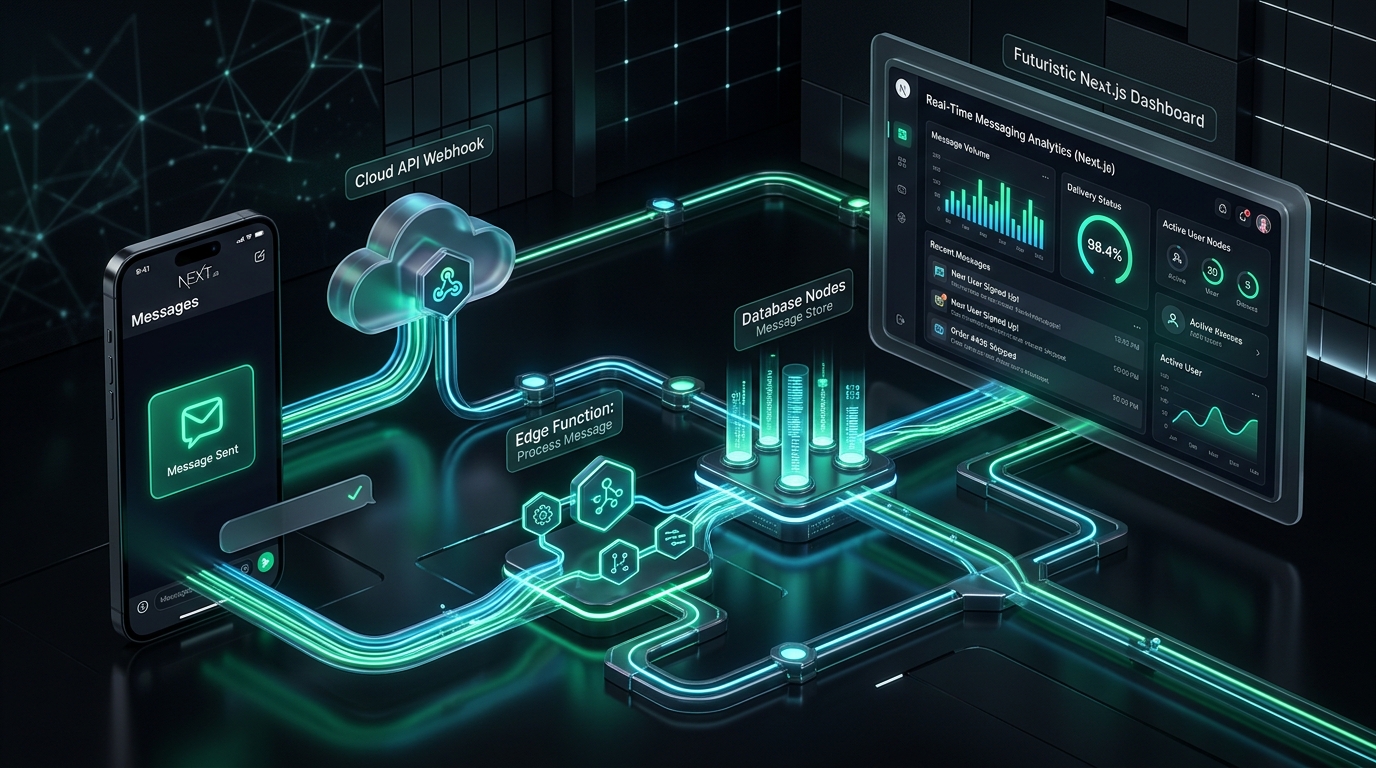
From WhatsApp to Dashboard: The Architecture Behind CampusCast
Every practical way to turn a WhatsApp message into a live department display, and the trade-offs that decided CampusCast's architecture.
CampusCast started as one of those ideas that sounds finished the moment you say it out loud.
“What if anyone in a department could send a WhatsApp message and have it show up on a digital display screen in real time?”
A message goes in. A screen lights up. Done. Ship it, right?
Then we actually sat down to build it, and the simple idea turned into a genuinely interesting design problem. How does the message reach our application in the first place? Who's on the other end catching it? Where does it live once it's caught? How does the display know to go fetch it? And underneath all of that — which combination of these choices can survive being deployed in an actual institution, not just a demo in front of a professor?
That last question is the one that mattered. CampusCast is a final-year engineering project, but the goal was never “does this technically work once.” It was: is this reliable, maintainable, affordable, and realistic enough that a college department could actually run it. Those four words disqualify more clever solutions than they permit.
The Shape That Never Changes
Here's the thing that took embarrassingly long to notice: no matter which technology you throw at this problem, the skeleton underneath is identical.
Whether the message comes through Meta's official Cloud API, a self-hosted automation workflow, or an unofficial WhatsApp Web session — the pattern is Sender → Receiver → Display, every time. The database layer doesn't care where the message came from. Next.js doesn't care either. It just wants data to render.
What actually changes between architectures is narrower than it looks: who plays the receiver, and how the sender connects to it. That's the entire decision space.
Choice One: How Does WhatsApp Even Talk to You?
There are two fundamentally different ways to get messages out of WhatsApp and into your system:
Meta's Cloud API
OfficialRegister a WhatsApp Business number with Meta. Inbound messages arrive as signed HTTPS POST requests to a webhook URL. Free tier (1,000 monthly conversations) + 99.9%+ SLA. Fully sanctioned.
Baileys / Web Session
UnofficialAuthenticates as a WhatsApp Web QR-code client over WebSockets. Free and instant setup, but fragile: protocol changes break it, sessions log out, and Meta bans numbers that violate ToS.
The honest one-line version:the official API is slower to set up but sanctioned and reliable long-term; the unofficial session is instant and free, but not something you'd want to put an institution's name behind. For CampusCast, a notice board that silently dies because a session logged out is a liability with a nice UI.
Choice Two: Who Catches the Message?
Once you've decided how messages arrive, something still has to receive that webhook, make sense of it, and write it to a database.
| Receiver | Cost | Effort | Best used for |
|---|---|---|---|
| Serverless Function (Edge/Worker) | Free tier generous | Medium — code & deploy | Production builds & institutional apps (CampusCast) |
| n8n (self-hosted) | Free | Low — visual workflow | Fast prototyping, non-dev pipeline extensions |
| Google Apps Script Web App | Free | Very low | Quick internal tools writing straight to Sheets |
| Zapier / Make.com | Stingy free tier | Minimal | One-off demos, nothing more |
A serverless function is more work upfront than dragging boxes in n8n, but it's the only option that doesn't quietly start costing money or hitting rate limits when real usage arrives.
Choice Three: How Fast Does the Screen Need to Know?
The last variable is how the display finds out something new has arrived, and this one is really a question about how urgent “real time” actually needs to be.
Sub-second updates. Right call when the screen is meant to feel alive (live audience signage).
Dramatically simpler to build, debug, and reason about. In hallway displays, 5-second polling is visually indistinguishable from instant.
Best for static daily digests where nobody is staring continuously at the screen.
Putting It Together: The Decision Guide
Stack these three choices on top of each other and a decision matrix falls out:
The Lesson Underneath the Architecture
The most interesting thing that came out of this research wasn't any single technology choice. It was noticing how little the overall architecture actually changes across options.
Good systems are rarely the result of reaching for the most powerful technology available. They're the result of understanding the trade-off space clearly enough to choose the most appropriateone — and being honest about which corners you can't afford to cut when the thing you're building has to survive contact with an actual department.
“The technology choices are easy once you actually understand what you're choosing between.”